From your tasks to an agent you can improve
Start with the provided simulation tasks and connect your model. Create your own tasks to expand the training corpus and specialize the agent for your application. Collect experience with MAGMA-GEN, train with your own pipeline, and use MAGMA-BENCH to compare progress between model versions.
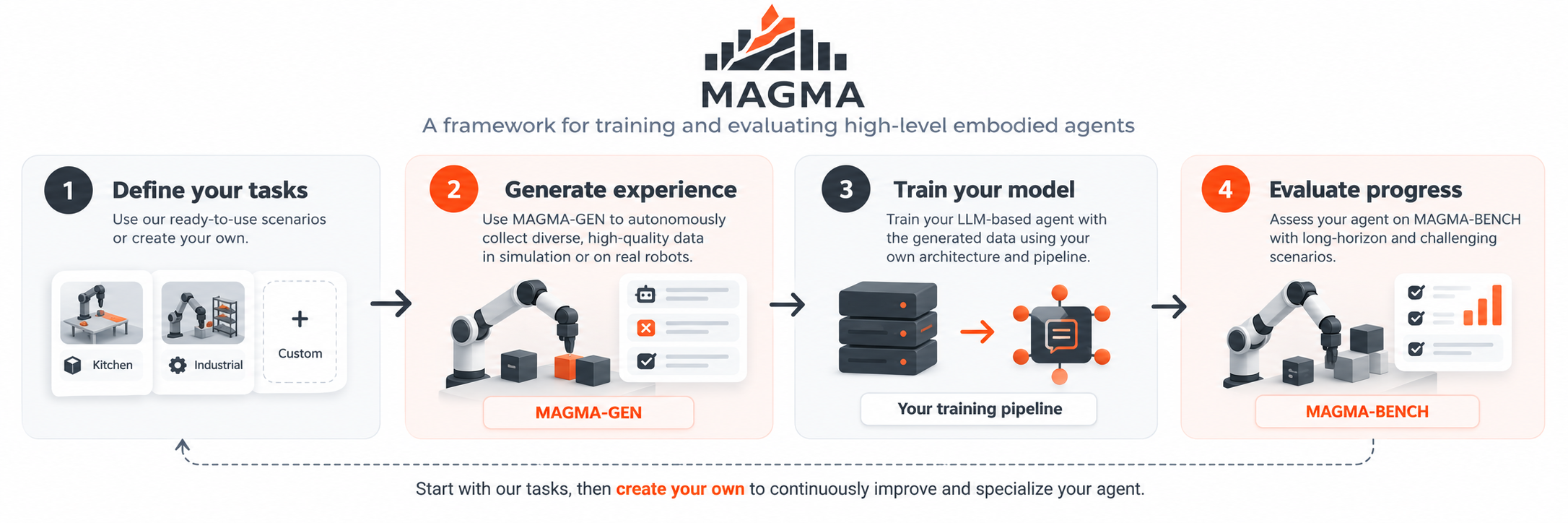
Two projects supporting the learning workflow

Learn from mistakes through validated corrections
MAGMA-GEN collects an agent’s own trajectories, including the situations reached through its mistakes. Coaching follows three steps: diagnose a possible cause, propose a correction, and validate the resulting continuation by executing it in simulation. A proposed correction becomes useful supervision only when its recorded outcomes support it.
The collected examples can then be used for supervised training. The agent’s weights stay fixed during collection; GEN does not run an online reinforcement-learning update. Read about the method and research.
Start with the workflow you need
Generate your first dataset
Run a provided task, inspect the agent’s decisions, and export selected training examples.
Follow the generation guide →Create your own task
Define instructions, available actions, and success conditions. Start with a manual test, without an LLM.
Build a scenario →Connect your model
Use a compatible local checkpoint or implement your own agent with custom prompts and memory.
Integrate your agent →